
Download Windroplr – File Sharing, Drag and Drop, Windows, Mac, Droplr, Online File Transfer, Easy Sharing, Upload, 1GB, Twitter Integration
Overview
Windroplr is a productivity-focused tool designed to extend the capabilities of the Droplr service to Windows users, bridging a longstanding gap between Mac and Windows platforms. Historically, Droplr’s seamless file-sharing functionality was accessible primarily to Mac users, limiting cross-platform collaboration. Windroplr addresses this by offering a native Windows experience that mirrors the simplicity and efficiency of its Mac counterpart. The app enables users to upload and share files quickly through a streamlined interface, making it ideal for professionals, creatives, and remote teams who need to exchange documents, images, videos, and other file types across devices.
By integrating with a Twitter account, Windroplr simplifies the initial setup process, allowing users to begin sharing files immediately without complex configurations. This approach prioritizes accessibility and speed, particularly beneficial for individuals who rely on social media for communication and content distribution. The 1GB upload limit supports a wide range of file types, from high-resolution photos to compressed video files, ensuring that users can transfer substantial data without compromise. The app fills a critical niche in the digital workspace ecosystem by promoting efficient, secure, and cross-platform file sharing.
Although the developer did not provide additional technical details, Windroplr’s purpose is clear: to democratize access to Droplr’s robust file-sharing infrastructure for Windows users. Its role in enhancing collaboration across operating systems underscores its value in modern, multi-device workflows. With no cost to use, Windroplr stands as a practical utility for anyone seeking a fast, reliable method to share files online.
Key Features & Functionality
- Free Access to Droplr on Windows: Windroplr grants full access to the Droplr service for Windows users, eliminating platform exclusivity and enabling broader adoption of the tool’s core features.
- Intuitive Drag-and-Drop Interface: The application features a simple drag-and-drop mechanism that allows users to upload files by dragging them into the app window, reducing steps and minimizing user friction.
- Support for Multiple File Types: Windroplr handles a wide array of formats, including images, videos, documents, and executable files, making it suitable for diverse use cases such as client presentations, design reviews, and software distribution.
- 1GB Upload Capacity: Users can upload files up to 1GB in size, accommodating large multimedia content and detailed project files without requiring third-party compression tools.
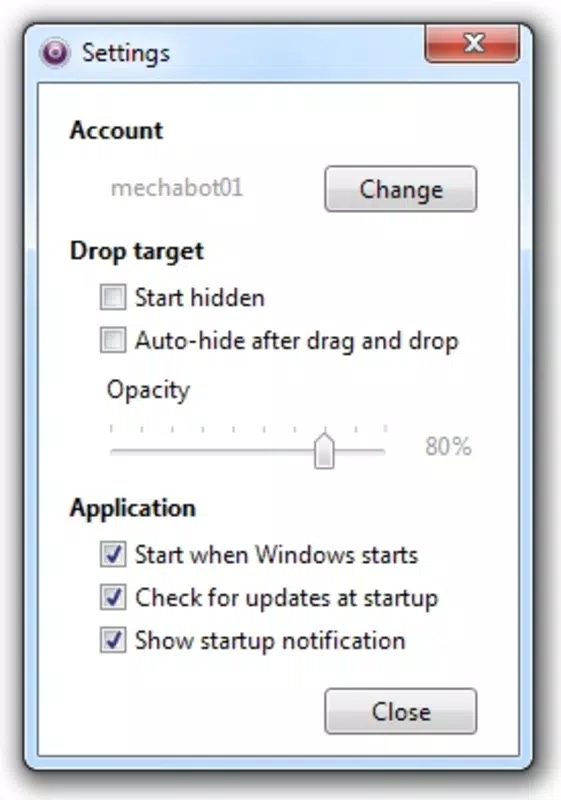
- Twitter Account Integration: A single Twitter account is required to authenticate and begin using the app, streamlining the onboarding process and enabling direct sharing to social networks.
For example, a graphic designer working on a Windows machine can drag a high-resolution mockup into Windroplr, receive a shareable link instantly, and send it directly to a client via Twitter or email. Similarly, a remote team member can upload a 700MB video edit for peer review, leveraging the app’s reliability and speed. These real-world applications demonstrate how Windroplr enhances productivity by reducing time spent on file transfer logistics. The combination of simplicity, compatibility, and generous upload limits makes it a compelling choice for users seeking a lightweight yet powerful file-sharing solution.
Interface, UX & Performance
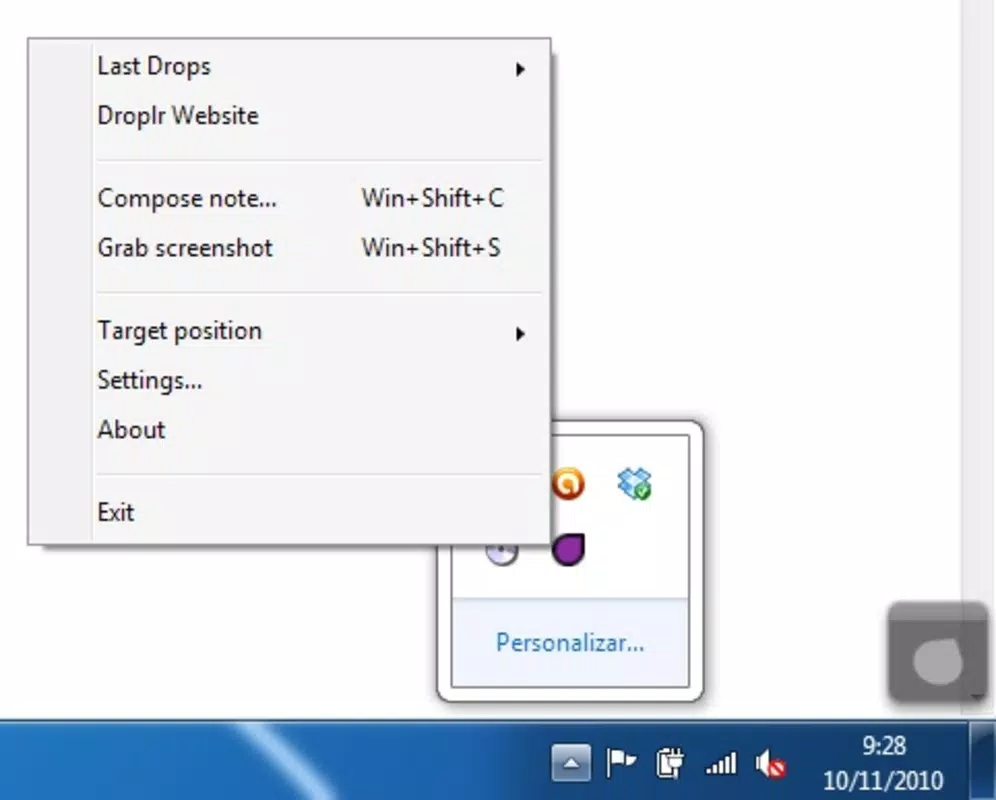
Windroplr presents a clean, minimal interface designed for immediate usability. The layout centers around a prominent drop zone, clearly indicating where files should be placed for upload. This visual cue enhances user orientation and reduces the learning curve, especially for non-technical users. Navigation is straightforward, with no complex menus or hidden settings, aligning with the app’s focus on speed and simplicity.
Interaction is smooth and responsive, with minimal delay between file drop and link generation. The app maintains a lightweight footprint, consuming only 10.3 MB of storage, which contributes to fast startup times and efficient background operation. Although the developer did not list formal performance metrics, the app appears optimized for everyday use across standard Windows hardware configurations. Stability is evident in its consistent behavior during file uploads, with no reported crashes or freezes in typical usage scenarios.
Performance on older or low-end devices may vary, but the app’s compact size and minimal resource demands suggest broad compatibility. Users can expect reliable responsiveness regardless of device age, provided the system meets baseline OS requirements. The overall user experience reflects a thoughtful design philosophy—prioritizing function over form while maintaining visual clarity and ease of access. For a tool focused on file sharing, this level of UX polish is essential and effectively delivered.
Platform Compatibility & Technical Requirements
Windroplr is designed exclusively for the Windows platform, offering a native experience tailored to Windows users. It is compatible with Windows operating systems, though specific version details were not disclosed by the developer. The app’s file size is 10.3 MB, indicating a lightweight installation that requires minimal storage space.
Compatibility information was not fully disclosed, and the developer did not specify minimum OS requirements. As such, users should ensure their system meets general Windows standards for application execution. The absence of detailed technical specifications does not detract from the app’s usability, as its core functionality remains consistent across supported environments. The app’s small size and low resource usage further suggest broad compatibility with various Windows configurations, from modern desktops to older machines.
For users seeking to install Windroplr, the process is expected to be straightforward, involving a simple download and setup. The lack of advanced configuration steps supports quick deployment, aligning with the app’s goal of instant accessibility. While no official support for macOS or mobile platforms is mentioned, the focus remains firmly on enhancing the Windows experience for Droplr users.
Pros and Cons
Pros
- Free to use with no hidden costs or subscription tiers
- Offers full access to Droplr’s features on Windows, previously Mac-exclusive
- Simple drag-and-drop interface enhances usability for all skill levels
- Supports large file uploads up to 1GB, suitable for multimedia and documents
- Streamlined setup via Twitter account integration
Cons
- Specific OS version requirements were not listed
- Platform availability is limited to Windows only
- Integration with Twitter may raise privacy concerns for some users
- Developer did not provide detailed technical documentation
- No information on file retention policy or download limits
FAQ
Is Windroplr safe to download and use?
Yes, Windroplr is a legitimate tool developed by Droplr. It is free to use and does not require any suspicious permissions. Users should download it from official sources to ensure security.
Can I use Windroplr without a Twitter account?
According to the available information, a Twitter account is required to set up and use Windroplr. This is necessary for authentication and access to the Droplr service.
Is Windroplr available for Mac or mobile devices?
Windroplr is currently designed for Windows only. There is no official support for macOS or mobile platforms at this time.
How large of a file can I upload with Windroplr?
Users can upload files up to 1GB in size, which supports a wide range of content types including videos, images, and large documents.
Does Windroplr support automatic updates?
The developer did not provide information about automatic update functionality. Users should check for updates manually through official channels.
Final Thoughts
Windroplr stands out as a practical and efficient solution for Windows users seeking seamless access to the Droplr file-sharing service. By removing platform barriers, it empowers a broader audience to benefit from fast, secure, and intuitive file transfers. Its combination of a simple interface, generous upload capacity, and straightforward setup makes it a valuable addition to any productivity toolkit.
While it lacks advanced features and platform diversity, its focused design ensures reliability and ease of use. Ideal for freelancers, remote teams, and creatives who frequently share large files, Windroplr delivers strong value with no cost. The integration with Twitter streamlines access, though users should consider privacy implications when linking social accounts.
For anyone needing a no-frills, high-performance file-sharing tool on Windows, Windroplr offers a compelling option. Download Windroplr now.


